Purchasing Decision Documentation for Sole Source Justification and Bid Summary Form
Purchasing Decision Documentation Form
When you fill out Purchasing Decision Documentation, you will be asked a series of questions that must be answered regarding the type of purchase and process used for making your supplier selection. Once you have completed answering the questions, a Bid Summary or Sole Source Justification Form will be created based on your answers:
- Bid Summary Form: The product or service needed can be provided by multiple suppliers resulting in the need to acquire multiple bids/quotes.
- Sole Source Justification Form: The product or service needed can only be provided by a single supplier and the purchase should be exempt from the competitive bid process.
Access, Complete and Submit the Form
Purchasing Decision Documentation Form
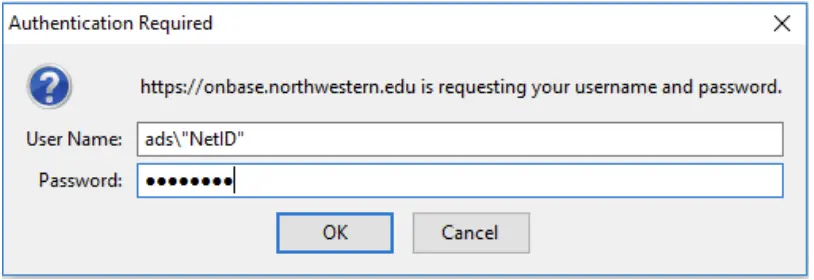
You will be prompted to sign in with your NetID and password.
After you've logged in and if the form format or color looks unusual (i.e., an all white background), clear your web browsers cache, or try using a different browser.
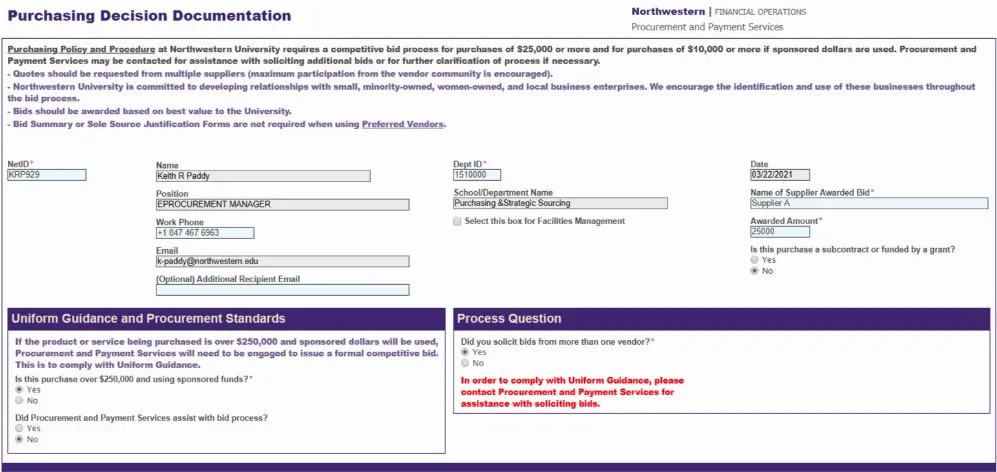
- Once logged in, you will be required to fill in fields with a red asterisk. All grayed out fields are auto filled and cannot be edited. Please note, if you would like the completed form to be emailed to an additional person besides yourself, you can enter their email address in the field titled "(Optional) Additional Recipient Email". Only one additional email address can be entered.
- You will need to answer the required questions under the Uniform Guidance and Procurement Standards section in order to move to the next section on the form. **If you are using sponsored funds and your purchase is $250,000 or more, Procurement and Payment Services should have been engaged to assist with your purchase. Note: If your purchase falls into this scenario and you did not engage Procurement and Payment Services, you will receive an error message and not be able to complete the form. To learn more, visit the Uniform Guidance page.
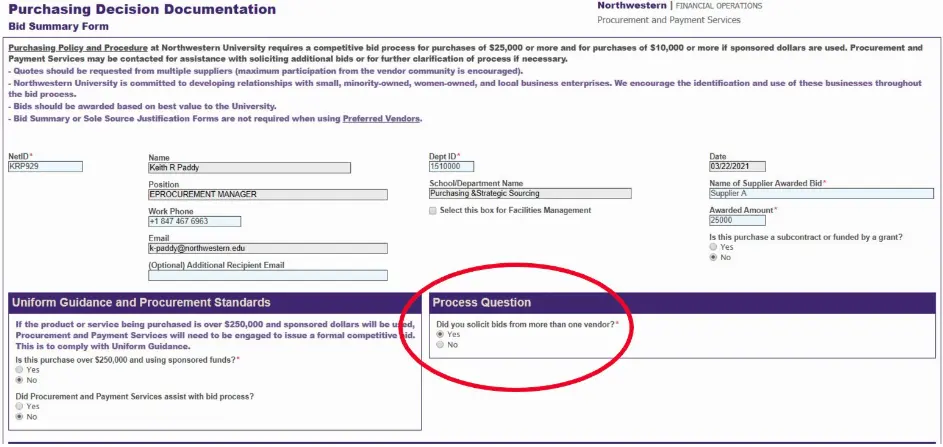
- If you have obtained more than one bid, select "Yes" for the question asking if you received more than one bid.
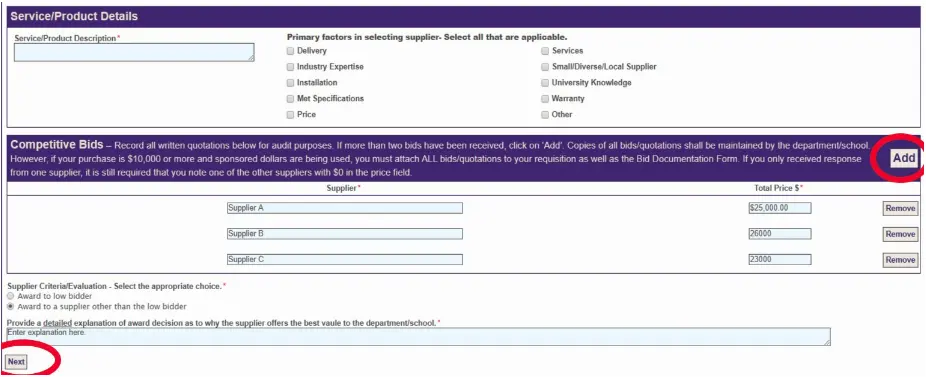
- Service/Product Details Section – Enter a detailed description of the service or product select all applicable primary factors in selecting the supplier awarded the bid.

- Competitive Bids Entry Section – Enter the supplier name and total price for all bid responses received.
- Two (2) quotes are required but Procurement and Payment Services recommends to obtain a minimum of three (3). You will be prompted to enter two quotes; if you have more than three quotes, click the Add button to add additional fields.
- After all quotes have been entered, make a selection under Supplier Criteria/Evaluation. If "Award to a supplier other than the low bidder" is selected, you will be prompted to provide a detailed explanation of your award decision. Continue by selecting the "Next" button.
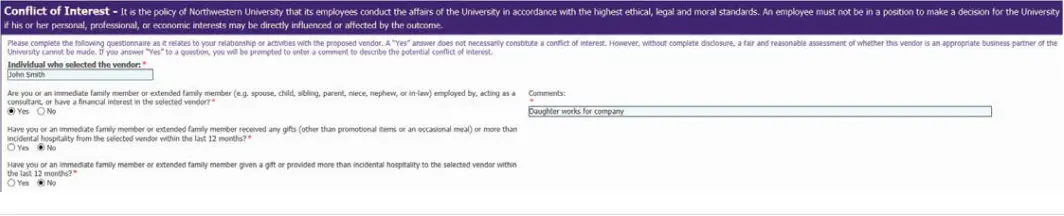
- Conflict of Interest Section – When completing the Conflict of Interest section, responses should be made according to the individual who selected the supplier. Note that any "Yes" responses will require an explanation to be entered in the comment field.
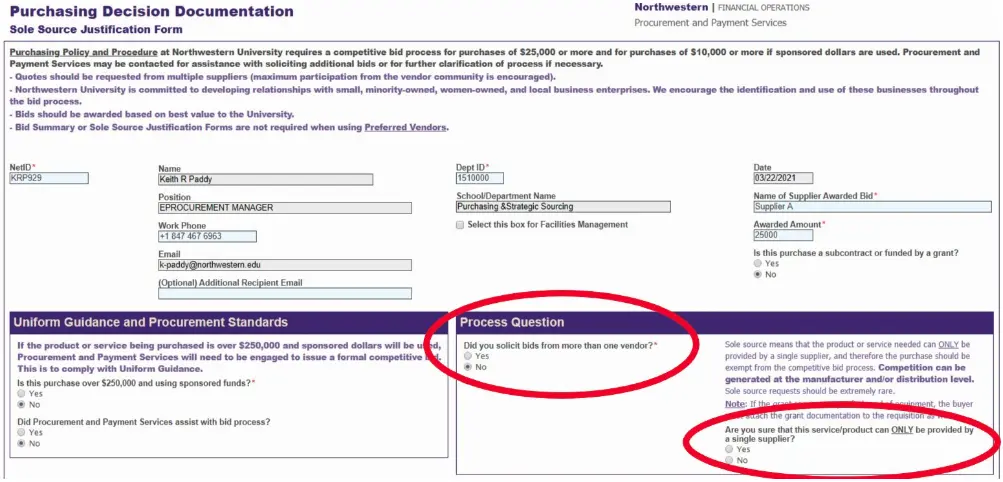
- If you received one (1) bid and only one supplier can provide the product or service, select "No" for the question asking if you have more than one bid and select "Yes" confirming the product or service can only be provided by a single supplier.
 Service/Product Details Section – Enter a detailed description of the product or service and select all applicable primary factors that assisted you in your supplier selection.Noncompetitive Purchase Justification – Select all conditions that are relevant as to the reason a competitive bid process was not appropriate for the product or service. For every condition selected, you will be required to provide an explanation. After selecting all relevant conditions and providing an explanation, continue by clicking the "Next" button.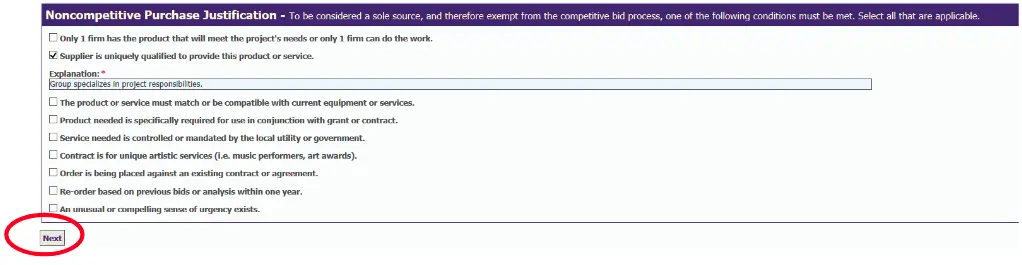
- Conflict of Interest Section – When completing the Conflict of Interest section, responses should be made according to the individual who selected the supplier. Note that any "Yes" responses will require an explanation to be entered in the comment field.

Sole Source Justification
A department or school may determine that a Sole Source purchase is justified.
Sole source means that a single vendor is uniquely qualified to meet the department/school's procurement objective. To be considered a sole source and therefore exempt from the bid process, one of the following conditions must be met:
- Only 1 firm has the product that will meet the project's needs or only 1 firm can do the work.
- Supplier is uniquely qualified to provide this product or service.
- The product or service must match or be compatible with current equipment or services.
- Product needed is specifically required for use in conjunction with grant or contract.
- Service needed is controlled or mandated by the local utility or government.
- Contract is for unique artistic services (i.e. music performers, art awards).
- Order is being placed against an existing contract or agreement.
- Re-order based on previous bids or analysis within one year.
- An unusual or compelling sense of urgency exists.
Negotiating with the Vendor
If the need meets one of the above criteria, the department/school should solicit a formal quote and negotiate with the vendor directly, or request that Purchasing Strategic Sourcing negotiate with the vendor on their behalf.Please note that if the vendor selected is requesting that the department or school sign something, it must be reviewed by the Office of General Counsel (OGC). Once it is reviewed and approved, it will be forwarded to the appropriate officer of the University for signature. Learn more about Signature Authority.
For Purchases $25,000 or More
For purchases of $25,000 or more ($10,000 or more if sponsored dollars are used), a completed Sole Source Justification Form must be attached to the Requisition in NUFinancials.
To obtain a Sole Source Justification Form, fill out a Purchasing Decision Documentation form. Based on your responses, a Sole Source Justification Form (or a Bid Summary Form, of it is determined that a bid is the appropriate route) will be created.