Amazon Business Support
www.amazon.com/gp/help/contact-us
(888) 281-3847
Amazon should only be used if an item is unavailable through a Northwestern Preferred Vendor. Preferred Vendor catalogs in iBuyNU cover millions of SKUs at discounted pricing and should be used whenever possible. Amazon fills gaps in product availability. Northwestern email addresses should never be associated with an Amazon personal account. If you shop on Amazon via iBuyNU or your Corporate Card associated with the Corporate Card Amazon Business Account, and your Northwestern email address is associated with your personal account, you may experience issues, and purchases made through your Amazon Personal Account may be viewable to Northwestern Amazon Administrators. This also creates tax risk, as the University is tax-exempt, but you, as an individual, are not.
Fees associated with membership clubs or the creation of online accounts (e.g., Amazon Prime, Sam's Club, Costco, etc) are not allowed on the corporate card. Additionally, purchases made over the internet should be minimized whenever possible.
After the corporate card office has registered your email for the Amazon Business account, find the scenario below that applies to you and follow the steps provided to complete registration.
Convert existing account to an Amazon Business account is only recommended for users who have NOT made personal purchases on their account.
Sign in to your existing Amazon.com account using the pre-populated email. Click "Start Shopping"
and you are ready to go!
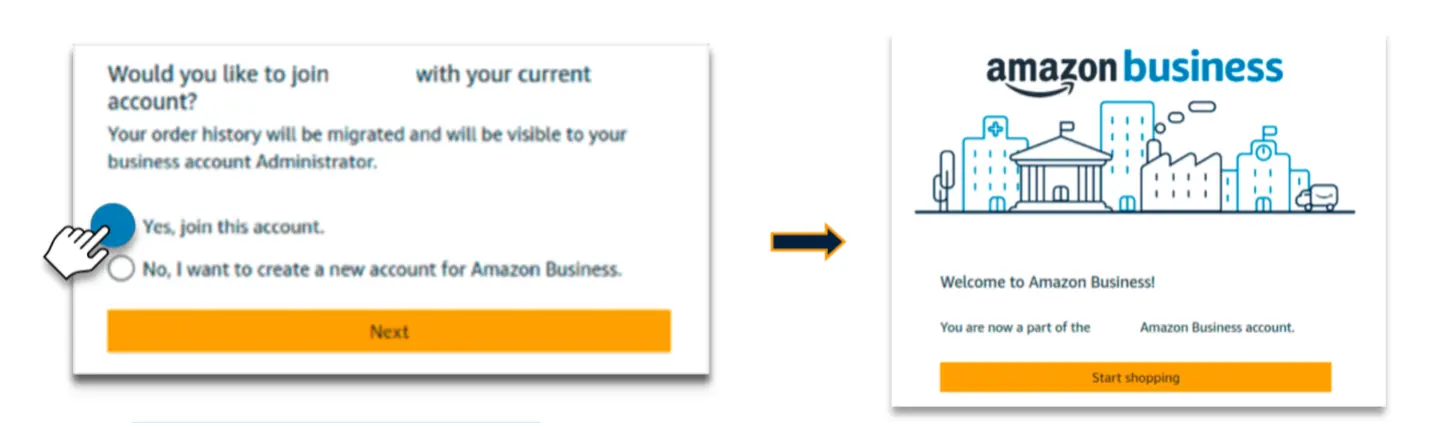
If you already have an Amazon account tied to your work email address, and use this account solely for business purchases, you will migrate this existing account to your organization’s Amazon Business account. Do not choose this option if you have made personal purchases on this account.
Create a separate business user account. Sign in to your existing Amazon.com account using the pre-populated email. Click the "No, I want to create a new account for Amazon Business." and then click "Next."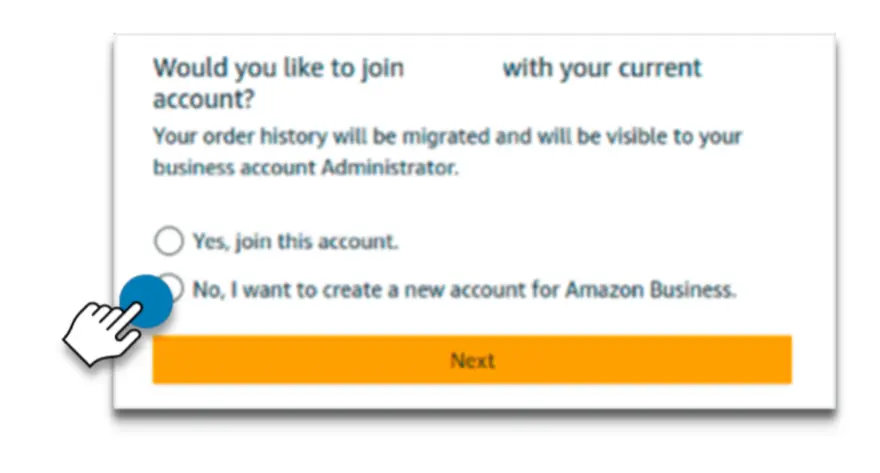
Enter a new email for you existing Amazon account and click next. Your password stays the same. Click "Start shopping"
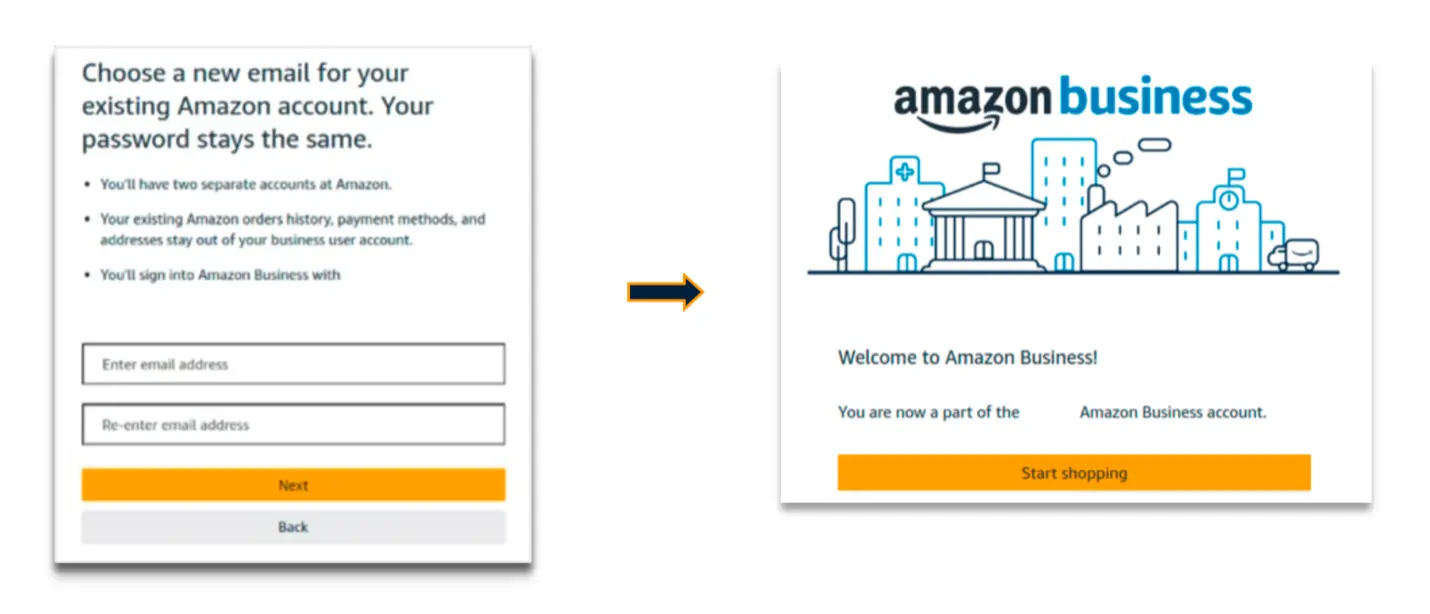
If you have an existing Amazon account tied to your work email and use this account for business and personal purchases, we will separate your personal order history from your work email. The email you designate at this time will be used to access your previous account moving forward, including order history, saved payments, and shipping addresses.
Enter email address that welcome email was sent to. Click "Join" on the Join official account page.
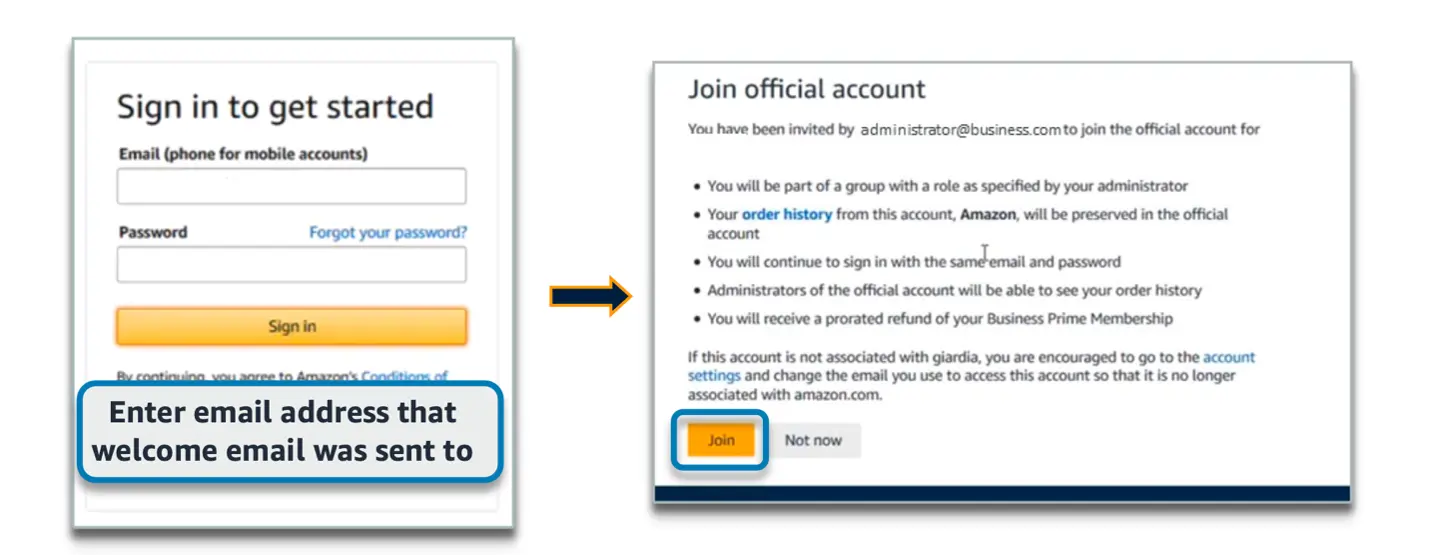
Effective February 1, 2015, the State of Illinois requires sales tax collection on online orders shipped to Illinois addresses. Northwestern University is tax-exempt; therefore, cardholders must use a University Amazon Business account for all authorized University purchases.
Northwestern's tax-exempt status may only be used for official University business purposes. Any unauthorized use, including personal purchases, may result in account suspension or closure and could jeopardize the University's tax-exempt status.
An Amazon Business account must never be used for personal purchases.
Northwestern University does not pay for personal memberships, including Amazon Prime. Personal Prime benefits remain with your personal account. You should never share your Amazon Business Prime Account or use it for personal purchases.
Purchases from Amazon Marketplace (third-party sellers) are not automatically tax-exempt. Provide a single-use tax exemption certificate to the vendor if required.