Payment to Individuals: Concourse/NUQuickPay
Payments to US based individuals can be issued either by live check, or through NUQuickpay when selected during the vendor creation step.
Electronic Payments
PPS manages the Concourse/NUQuickPay program, which is a way for Northwestern to pay people electronically via Zelle or ACH. This is available to individuals (e.g., visitors, research subjects, independent contractors) who are set up as suppliers within NUFinancials and paid through the normal Payment Request or Purchase Order processes
Documentation Requirements
- Individuals must provide completed documentation (Contracted Service Form, Visitors' Expense Report, Direct Payment Request) depending on the type of payment requested. Visit our form library.
- Original receipts must be provided for reimbursements
- Documentation is attached to the Payment Request
AP Process Steps
- AP reviews Payment Requests and documentation in NUFinancials
- Upon final approval, payment is issued
Concourse/NUQuickPay
The Concourse/NUQuickPay program is a way for Northwestern to pay people electronically via Zelle or ACH. This is available to individuals (e.g., visitors, research subjects, independent contractors) who are set up as suppliers within NUFinancials and paid through the normal Payment Request or Purchase Order processes.
The individual will receive an email notification when the payment is available. Individuals can also access the payment through the Concourse website if the email is not received.
Changes to Concourse/QuickPay Registration - Effective October 16, 2023
- Previously, an email address and/or a cell phone number was acceptable for Concourse/NUQuickPay registration. Now an email address only is accepted for registration. Once registered through Chase Bank, the vendor may update their profile to add a cell phone number for notification purpose.
- When payment is scheduled, all individuals previously registered for Concourse/NUQuickPay with an email address will receive a new email from Chase Bank prompting them to re-register for Concourse/NUQuickPay.
Eligibility Requirements for Concourse/NUQuickPay
- Individuals must have a mailing address within the United States
- Individuals must have an account with a US-based bank
Initiate Concourse/NUQuickPay
With this program, after a payment is processed in NUFinancials, the individual will receive an email notification (per the contact info provided on their profile in NUFinancials) from JPMorgan Chase bank.- If the individual's contact info matches an existing Zelle profile, the notification will inform them that a payment has been sent to their bank and they will soon receive a separate confirmation from their bank.
- If the individual does not have a Zelle account (or has one that does not match their email in NUFinancials), the notification will state that Northwestern is sending a payment and they must register with Chase to direct the electronic payment to their bank account. The individual DOES NOT need to have a Chase account to register.
- Individuals can access the payment through the Concourse website if the email is not received. Sometimes, spam filters prevent these emails from being delivered.
- Individuals can reference Chase's Concourse Quick Start Guide.
Once registered, all future payments will be routed automatically the same way. If an electronic payment has not been accepted within 14 days, it will expire and consequently be reissued as a paper check to be mailed to the individual's address on file.
Please note that only people are eligible for Concourse/NUQuickPay. Companies should sign up through one of the existing electronic payment programs, Paymode-X (ACH) or ePayables (dedicated credit card).
How to Request the Concourse/NUQuickPay Payment Method
If the individual is not yet set up as a supplier in NUFinancials:
- Use the Supplier Registration form in NUFinancials for the new individual.
- Select Supplier/Independent Contractor or Refund/Reimbursement.
- Then select Independent Contractor or Refund as the classification.
- Attach the documentation required for a new independent contractor
- W-9
- Conflict of Interest Form
- OnBase Individual Worker Classification Form
- An email from the vendor requesting payment via Concourse/NUQuickPay and indicating their email address.
- OR Attach the documentation required for a refund/reimbursement
- Visitor's Expense Report
- Receipts
- An email from the vendor requesting payment via Concourse/NUQuickPay and indicating their email address.
- Attach the documentation required for a new independent contractor
- Then select Independent Contractor or Refund as the classification.
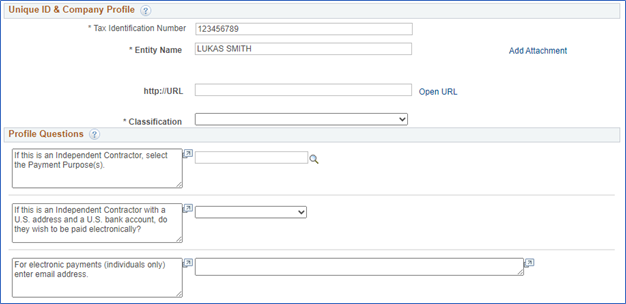
- Answer "yes" to the Profile Question asking if they wish to be paid electronically.
- Answer the Profile Question that asks for an email address.
- Fill out the rest of the Registration form as you normally would for a new supplier.
If requesting this payment method for an individual that already has a profile in NUFinancials:
- Use the Supplier Change Request form in NUFinancials.
- Answer "yes" to the Profile Question asking if they wish to be paid electronically.
- Answer the Profile Question that asks for an email address.
- If there are no other changes to the individual's profile, upload an attachment as required and proceed to the Submit page.
- An email from the vendor requesting payment via Concourse/NUQuickPay and indicating their email address.
Sample screen print from Registration form for independent contractor/research subject: