
Caption Super
Campton Book
Size: 64 px
Leading: 70 px
Tracking: -5 px
Kerning: Optical
Campton Book
Size: 64 px
Leading: 70 px
Tracking: -5 px
Kerning: Optical

Campton Bold
Size: 100 px
Leading: 120 px
Tracking: -5 px
Kerning: Optical

Northwestern wordmark
Size: One half of screen width
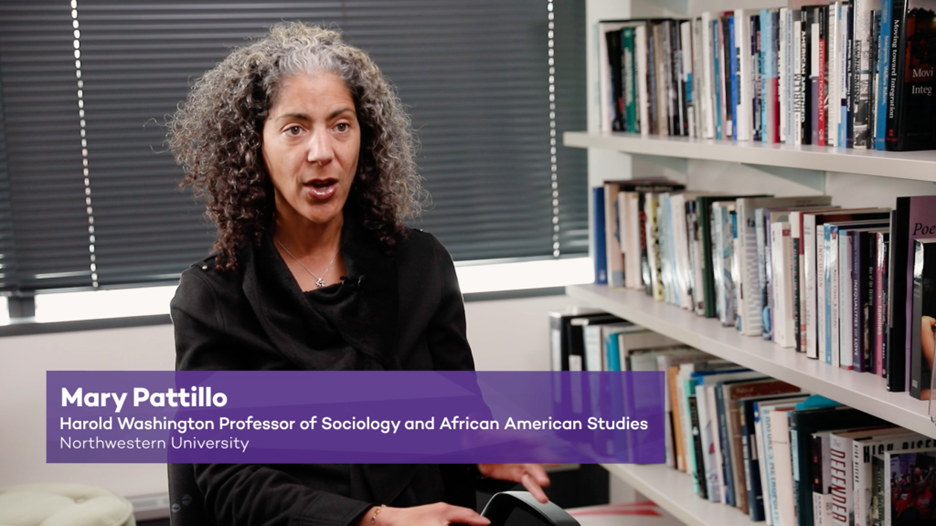
Lower Thirds Graphic Info
Name Line:
Font: Campton Semibold
Font Size: 69
Leading: 50px
Tracking: 0px
Title Line:
Font: Campton Semibold
Font Size: 34px
Leading: 50px
Tracking: -5px
Northwestern Line:
Font: Campton Light
Font Size: 34px
Leading: 50px
Tracking: -5px
Closed captions are required to ensure all videos are accessible. Typically, closed captions are provided by the video platform you use to upload and playback your videos (YouTube, etc). You should always be sure to turn closed captions on, and edit them for accuracy, in whatever platform you use to distribute your videos. In most video players, viewers will then have the option to turn the captions on or off as they prefer. In the occasional circumstances where a video player does not provide captioning, you may have to caption a video yourself. In those circumstances, use the following guidelines:

Captions Info: Background: NU Purple (RGB: 078, 042, 132; Hex: #4E2A84)
Font Color: NU White (RGB:255, 255, 255; Hex: #FFFFFF)
Font: Campton
Font Size: 60
Leading: 50px
Tracking: 0px
Maximum of 2 lines of captions on screen at a time.