Am I eligible for a check scanner?
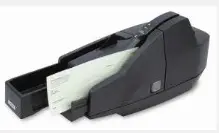 Departments with at least one check deposit per week can be issued a check scanner. Deposits of cash still need to be brought to a Depository Service office.
Initial installation of the scanner takes 60 minutes and requires administrative rights to the PC. If you are unsure if you have these rights, a phone call to your internal IT rep is needed.
A unique user name and password is required for scanning deposits as the scanner interfaces with a secure web-based deposit site hosted by JP Morgan Chase.
The check scanner cannot deposit foreign checks. These checks should be deposited within the guidelines of the foreign check deposit procedure section of “Depositing Revenue to the Bank”
JP Morgan Chase provides excellent customer service for troubleshooting deposits; they can be reached at (866) 872-3321.
For password resets, please contact depository.services@northwestern.edu.
It is recommended that each user log-in the Virtual Remit site (jpmorganaccess.com) every month to maintain access for scanning checks.
For more information on check scanners, please contact Depository Services at treasury_operations@northwestern.edu