Google Analytics
OGMC's Digital team manages Google Analytics 4 (GA4) for its clients to track web traffic and user behavior. If your site is supported by OGMC and you would like GA4 access or a Data Studio report (example), please fill out this form: Google Analytics Report Request.
If your site falls under a school (Weinberg, etc.) please contact the appropriate school's communications team for assistance. For NUSites websites, file a ticket with consultant@northwestern.edu.
Configuring Analytics to Prevent "Bad Request" Errors
Some users, particularly those using Safari as their web browser, have been encountering "Bad Request" errors when visiting Northwestern sites. These HTTP 431 errors typically say "size of a request header field exceeds server limit." Users experiencing the error should clear browser cookies for northwestern.edu.
The "Bad Request" errors are caused by too many cookies being set scoped to the main northwestern.edu domain. Website administrators can help prevent this issue by setting their Google Analytics tracking code to only apply to their specific subdomains and by removing old Universal Analytics Javascript from web pages.
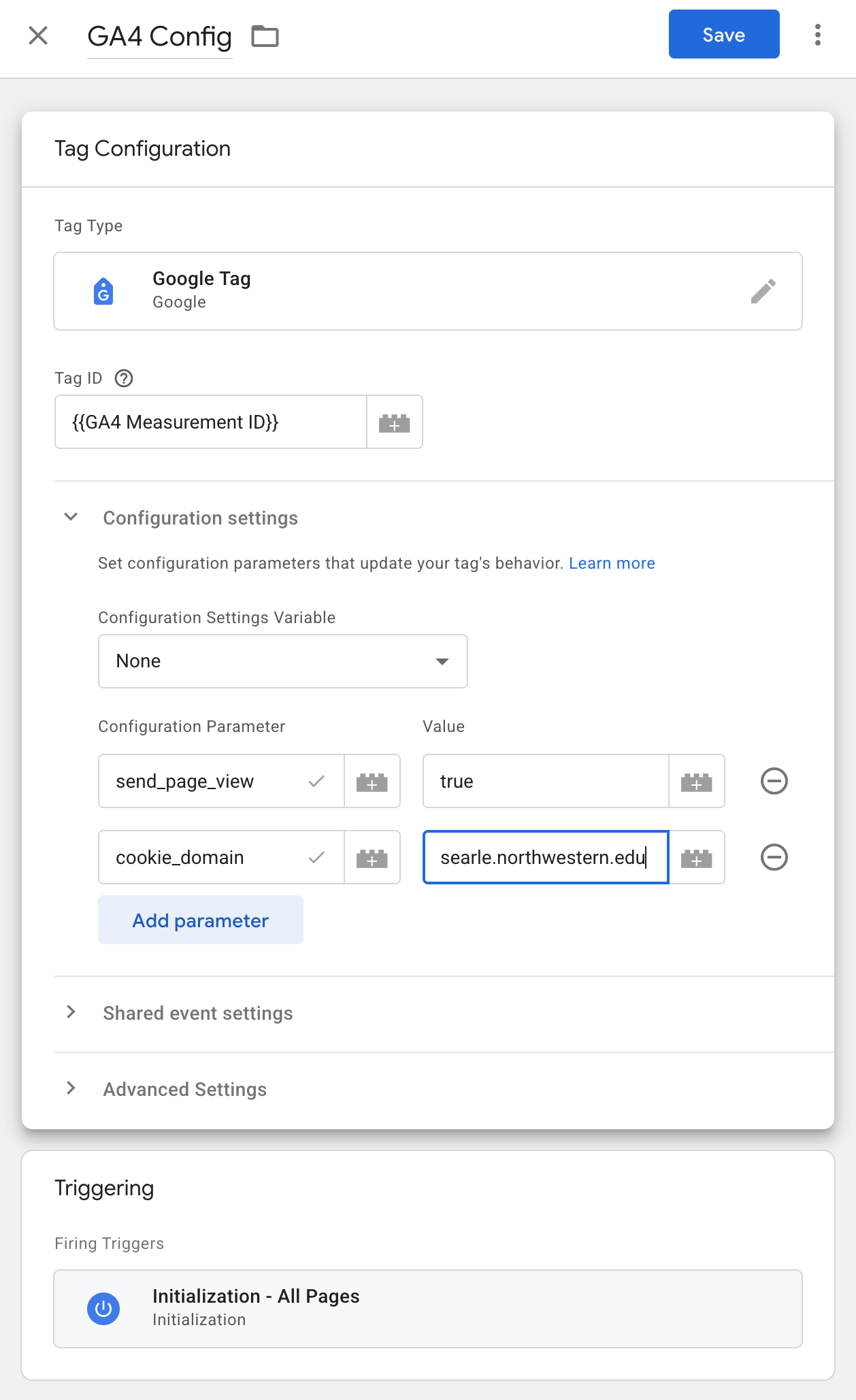
If you manage your Analytics through Google Tag Manager and you aren't using your tag on multiple subdomains, add a cookie_domain parameter to the Google Tag that fires on page initialization like in the screenshot below.